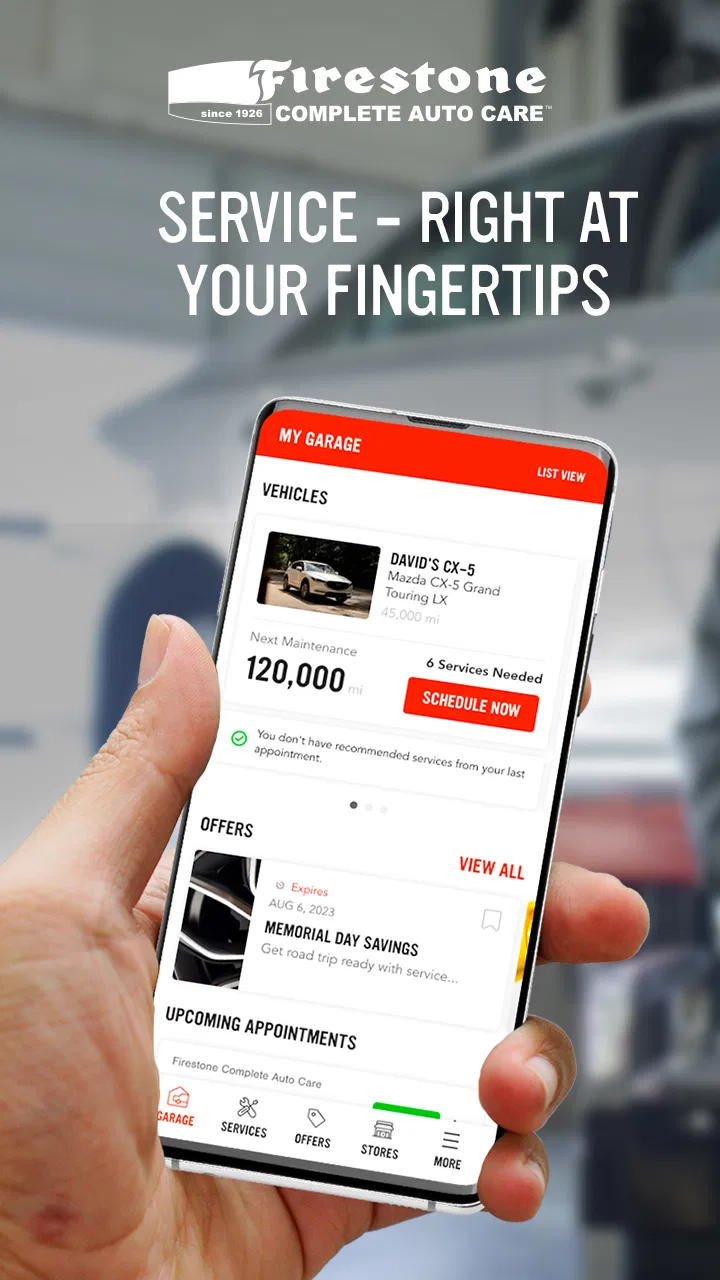
My Firestone
- 4.8
- Rating
- 500.00K
- Installs
- Free
- Price

 Analysis by App-foxy
Car maintenance is easy to postpone because the warning signs are rarely convenient. A service reminder appears while I am busy, a tire looks slightly low before a long drive, or I suddenly need to know where my vehicle’s records are. My Firestone is designed to make those ordinary moments easier to manage from a phone. Developed by Firestone Complete Auto Care, this free Auto & Vehicles app gives the brand’s customers a more direct way to stay connected with their car care.
I approached it as a practical ownership tool rather than a complete mechanic in my pocket. That distinction matters. The app is most useful when I want to organize Firestone-related service, keep maintenance from becoming an afterthought, and move from a reminder to an appointment with less friction. It is less convincing as a universal replacement for a vehicle manufacturer’s app, a dedicated maintenance log, or a hands-on diagnostic tool.
The central question is simple: does My Firestone help me make better decisions about routine car care? In my experience, it can, especially when I use it as part of a repeatable habit instead of opening it only after a dashboard light appears. Its average rating of 4.8 from around 14 thousand ratings suggests that many drivers find that focused approach useful, and the app has passed half a million installs. Those figures do not make it right for everyone, but they do show that it has a substantial audience.
You May Also Like

 Google Keep - Notes and lists
Google Keep’s Quiet Growth Shows the Appeal of Simpler Notes
As mobile work gets busier, Google Keep keeps winning a simple contest: capture a thought quickly, find it later, and get on with the day.

 Blood Strike: 2.5 Anniversary
Blood Strike’s Loadouts Turn Every Drop Into a Tactical Gamble
A close look at Blood Strike’s custom loadouts: how fast access to signature weapons reshapes its battle royale rhythm, rewards preparation, and narrows the gap between fights.

 Pandora - Music & Podcasts
Pandora’s Music Is Easy to Start, but Harder to Recover
Pandora’s strength is its low-effort path from a seed to a station. Its weak spot is how much confidence it asks you to place in connection, setup, and quiet recovery.

 8 Ball Pool
 Is Built on Rivalries, Rematches, and Routine
A close look at the rivalries, rematches, shared routines, and unanswered safety questions that turn a quick pool match into a persistent mobile community.

 Samsung Music
’s Quiet Strength Is Playing What You Already Own
Its reach comes less from spectacle than from dependable access to a personal library. That simplicity is both the app’s strongest retention engine and its ceiling.

 AccuWeather: Weather Radar
AccuWeather Review: A Quick, Clear Forecast for Everyday Decisions
For everyday plans, the best forecast is the one you can understand quickly. AccuWeather makes rain timing, radar, and local conditions easy to act on, with a few trade-offs.
More From Our News Desk



Making the everyday maintenance routine less scattered
The strongest starting point is to treat the app as a single place for the Firestone side of vehicle ownership. Rather than searching through browser tabs, old messages, and paper receipts, I can begin with the app when I need to think about service. That change sounds small, but it reduces the number of decisions between noticing a need and doing something about it.
A sensible baseline workflow begins before the car needs urgent attention. I would open the app while the vehicle is running normally, review the account and vehicle details available to me, and make sure the information is accurate. If a vehicle is represented incorrectly, even a well-organized service experience becomes confusing. Taking a few minutes to check the basics is more valuable than waiting until I am trying to arrange help on a busy day.
From there, I would use My Firestone around three recurring moments: planning routine work, preparing for a trip, and following up after a visit. Before a road trip, the app can be part of a broader checklist alongside tire pressure, fluid levels, lights, and emergency supplies. It should not be the only inspection, but it gives me a convenient prompt to address maintenance instead of relying on memory.
After service, the useful habit is to confirm what was done and retain the information in the same general workflow. This is particularly helpful when more than one person drives the vehicle. A partner or family member may know that the car visited a service center, but not remember which maintenance item was handled. Keeping the app involved makes that handoff clearer than a vague “the car was checked recently.”
One realistic example is a driver who notices that a tire has lost pressure twice in a month. The wrong response is to keep adding air and hope the problem disappears. I would use the app to arrange a professional check, then note the result mentally or in my wider vehicle records. The app helps with the service connection, but the important judgment remains mine: repeated pressure loss may deserve inspection rather than another temporary top-up.
This is where the app feels more useful than a generic calendar reminder. A calendar can tell me that I planned maintenance, but it does not naturally connect that reminder to the service relationship I am trying to manage. On the other hand, a vehicle manufacturer’s app may offer deeper information about fuel, remote controls, or factory-specific alerts. My Firestone has a narrower purpose, and that focus is an advantage if Firestone is already where I prefer to handle service.
What to check before relying on reminders
I would not assume that an app reminder automatically understands every detail of a vehicle’s real condition. Maintenance intervals vary with driving style, climate, load, vehicle age, and the work already completed. A reminder is a prompt to investigate, not permission to ignore the owner’s manual or a mechanic’s advice.
That is an important distinction for people who drive very little. A low-mileage car can still need attention because time, weather, and storage conditions matter. Conversely, a vehicle used for long commutes may need more frequent scrutiny than a simple date-based routine suggests. I find the app most reliable as an organizational layer, while the final decision should consider the actual vehicle and how it is used.
Drivers who maintain several vehicles should also establish a clear naming habit. If the app allows multiple vehicle records in the way I need, I would identify them consistently by model, color, or another private shorthand rather than relying on memory. The benefit is not cosmetic: selecting the wrong vehicle before arranging service is an avoidable mistake. If a household has only one car, this concern is smaller, but accurate setup still saves time later.
Settings and habits that make the app easier to use
The first settings worth checking are the ones that affect contact, vehicle identity, and service communication. I would review the account details, verify that the preferred contact information is current, and examine notification choices rather than accepting every prompt automatically. A maintenance app is helpful when it interrupts me at a useful moment; it becomes background noise when every alert feels equally urgent.
My preferred approach is to keep reminders that support action and reduce anything that merely repeats information I already know. For example, a service-related prompt before a planned trip may be valuable, while a general promotional message may not deserve the same attention. The exact controls can vary by device and app release, so I would inspect the current settings on the phone instead of assuming that every option is available to every user.
It is also worth checking the app after updating it. My Firestone is currently at version 7.0.4, and updates can change the placement of controls or the way screens are organized. I do not consider an update a reason to distrust the app, but I do consider it a reason to spend a moment confirming that notifications, account access, and vehicle information still behave as expected.
Privacy-conscious users should take the same practical approach they use with any account-based service app: enable only what is needed for the tasks they actually want, and review phone permissions through the operating system. I would not grant access reflexively just because an app requests it. If a feature is not part of my workflow, I prefer not to build my routine around it.
Another useful habit is to open the app on a stable connection before leaving for a long drive. I would not wait until I am in a parking lot with weak reception to discover that I need to sign in, confirm a detail, or arrange service. This is not a dramatic advanced technique, but it is the kind of preparation that separates a smooth experience from a frustrating one.
The app is rated for Everyone, which makes its presentation approachable for a broad range of drivers. Still, an accessible interface does not remove the need for careful decisions. A new driver may benefit from its structure, while someone who already keeps meticulous records may find the extra account layer unnecessary. The right setting is not simply “all notifications on”; it is a configuration that supports the way I actually maintain the car.
Using a repeatable pattern instead of searching every time
Experienced users usually gain more from consistency than from hidden tricks. My pattern would be to check the app at a fixed point in the month, then open it again before major trips or seasonal changes. That creates a predictable maintenance rhythm without pretending that every vehicle needs identical service on an identical schedule.
I would also separate three questions whenever I use it: what does the vehicle appear to need, what service do I want to arrange, and what should I verify afterward? Keeping those questions distinct prevents a reminder from turning into an automatic purchase. It also makes conversations with a service professional clearer because I can describe the concern rather than simply saying that an app told me to visit.
For families, the fastest pattern is to decide who owns the follow-up. If one person notices the reminder and another person drives to the service center, the task can easily fall between them. I would use the app as the starting point, then communicate the appointment and the vehicle concern directly. The app can organize the process, but it cannot replace a household agreement about who is responsible.
For a person selling a vehicle, the app should not be treated as the only maintenance history. I would retain invoices and other records separately, because a future buyer may want documentation that is not represented in the app. This is one of the less obvious trade-offs: convenience improves when information is centralized, but important ownership records should not depend on one application alone.
Compared with calling a service center every time, the app can feel faster for routine requests because I can begin on my own schedule. Compared with a spreadsheet, it is more connected to the Firestone service experience but less flexible for custom notes and work performed elsewhere. Compared with a general reminder app, it offers more automotive context but less freedom to manage unrelated providers. That comparison explains its best audience better than the store summary alone.
Where the focused approach reaches its limits
My Firestone is not the right choice for every kind of car owner. If I want live vehicle telemetry, remote starting, fuel tracking, or manufacturer-specific fault information, I would look first at the automaker’s application. If I service the car exclusively at independent garages, a neutral maintenance tracker may fit better. If I need a detailed repair database with custom costs, parts, mileage entries, and attachments, a spreadsheet or dedicated log may offer more control.
There is also a practical limitation in relying on a service-branded app: its value is tied to how closely my maintenance habits match that service network. Someone who lives far from a Firestone location, prefers a trusted local mechanic, or compares several providers may find the app less central. It can still be useful for information and planning, but it may not become the main record of the vehicle.
I would be cautious about interpreting a clean app experience as proof that the car is healthy. Digital organization cannot detect every mechanical problem, and a reminder cannot replace a tire inspection, a fluid check, or a qualified diagnosis. A vibration, unusual noise, burning smell, warning light, or repeated pressure change deserves attention even if the app shows no immediate task.
There can also be friction when a user expects the app to answer a question that belongs to the vehicle manual or a technician. “What does this warning light mean?” and “Is this repair urgent?” are not the same as “How do I arrange service?” I would use My Firestone for the latter and seek authoritative vehicle-specific guidance for the former. That division keeps expectations realistic.
Another trade-off is account dependence. The convenience of having service-related information available through an app comes with the need to maintain access to the account and keep contact details current. If I change phone numbers, switch devices, or share driving responsibilities, I would update the account promptly. Otherwise, the very reminders intended to reduce forgotten maintenance may reach the wrong person or become difficult to retrieve.
The app’s free price is a meaningful advantage for trying it without adding a separate subscription to the maintenance budget. However, free access does not make every service decision free, and I would still compare recommendations with the owner’s manual and my financial priorities. The app can reduce organizational friction; it should not pressure me into work that the vehicle does not need.
Its release history also suggests that it has been around long enough to become a familiar part of the Firestone digital experience, having first appeared on February 27, 2012. That longevity is reassuring in one sense, but I would still judge it by current performance on my phone and by whether its present workflow matches my needs. Older apps can evolve substantially, so the practical test is how well the current version handles my routine.
Who will get the most from it
I would recommend My Firestone to drivers who already use Firestone Complete Auto Care, want a simpler way to approach routine service, or tend to forget maintenance until it becomes urgent. It is especially suitable for people who prefer guided steps over building their own spreadsheet and for households that need a shared point of reference for one or more vehicles.
It is also a good fit for a new car owner who wants to develop a maintenance habit without starting with a complicated system. I would begin with accurate vehicle information, sensible notifications, and a monthly review. That is enough to create structure without turning car care into a daily administrative task.
I would recommend skipping it as a primary tool if I rarely use Firestone, already have a thorough independent maintenance system, or expect advanced vehicle data. In those cases, installing another app may create duplication rather than clarity. The best app is the one that reduces steps in the workflow I already follow, not the one with the broadest possible feature list.
My verdict after building a practical routine
My Firestone succeeds by staying close to a real ownership problem: remembering, planning, and following through on car care. I like it more when I use it deliberately—checking the vehicle setup, tuning notifications, opening it before a trip, and treating reminders as prompts for judgment. That approach makes the app feel like a useful service companion instead of another icon waiting for attention.
Its limitations are equally clear. It is not a universal maintenance history, a diagnostic scanner, or a substitute for a mechanic. Drivers outside the Firestone ecosystem may gain less from it, and people seeking detailed custom records or connected-car controls may be better served elsewhere. Those are not flaws to hide; they define the boundaries of the product.
For me, the strongest reason to install it is the combination of a free entry point, an approachable Everyone rating, and a focused connection to Firestone service. The developer, Firestone Complete Auto Care, has built something aimed at reducing the gap between noticing a maintenance need and acting on it. I would keep separate records for important repairs, verify recommendations independently, and never ignore physical symptoms just because the app is quiet.
My final recommendation is straightforward: if Firestone is part of your regular car-care routine, My Firestone is worth trying and can become genuinely convenient once you establish a repeatable habit. If your preferred garage, vehicle brand, or record-keeping method lies elsewhere, use it only if it removes a real step. The app is at its best not as a promise to take over car ownership, but as a practical way to keep ordinary maintenance from slipping through the cracks.
FAQs for My Firestone
01What is My Firestone and how does it work?
My Firestone is a comprehensive app designed to manage your vehicle’s maintenance and service needs. It allows users to schedule appointments, track service history, and receive reminders for upcoming maintenance. The app integrates with Firestone service centers, ensuring seamless booking and detailed records of all your vehicle's services.
02Is My Firestone available on both Android and iOS platforms?
Yes, My Firestone is available for both Android and iOS users. You can download it from the Google Play Store or the Apple App Store. The app is designed to provide a similar user experience across both platforms, ensuring that all features are easily accessible regardless of your device.
03Does My Firestone offer any special features for users?
Yes, My Firestone offers several special features including real-time service updates, exclusive discounts, and personalized maintenance schedules. Users can also access a digital tire catalog and receive notifications about tire recalls or promotions, making it a valuable tool for maintaining your vehicle’s health.
04How secure is my personal information on My Firestone?
My Firestone prioritizes the security of your personal information. The app uses advanced encryption and security protocols to protect your data. Additionally, they have a strict privacy policy in place to ensure that your information is not shared with unauthorized third parties, keeping your details safe and confidential.
05Can I use My Firestone to manage multiple vehicles?
Yes, My Firestone allows you to manage multiple vehicles under one account. You can add different vehicles, track their maintenance schedules, and view service histories individually. This feature is particularly useful for families or individuals who own more than one vehicle and want to keep track of all their service needs efficiently.
Pros
- User-friendly interface for easy navigation.
- Comprehensive vehicle service tracking.
- Convenient appointment scheduling feature.
- Access to exclusive discounts and offers.
- Detailed maintenance history available.
Cons
- Limited to Firestone service centers.
- Requires stable internet connection.
- No integration with third-party apps.
- Limited payment options within app.
- Occasional app crashes reported.

My Firestone
Gallery